ThreatStream API
Anomali ThreatStream is accessible through REST APIs available to all Enterprise customers. These APIs support bi-directional interaction with the ThreatStream platform.
You can use the APIs to retrieve threat intelligence for integration with third-party tools, import observables into ThreatStream, manage threat model entities, investigations, and so on.
Prerequisites
- A user ID and API key are required to access ThreatStream through the APIs. If you do not have these credentials, contact your ThreatStream Org Admin to create an account.
- APIs return attributes in the JavaScript Object Notation (JSON) format; therefore, familiarity with JSON is recommended.
Usage Limits
-
Only the API endpoints described in this document are supported.
-
Anomali enforces default limits for the API requests listed in the table below. Requests that exceed these limits are automatically throttled.
Notes:-
The API requests that are not listed in the table below are limited to 1 request per minute per user unless noted otherwise for an endpoint in this document.
-
Depending on the Anomali platform's health and current capacity, the effective limits may be lower than the default limits specified in the table below.
API Request Default Limit GET /api/v2/intelligence/
150/min/per user
Note: For intelligence requests with regex filter conditions applied, the default limit is 1 request per minute per user.GET /api/v2/intelligence/associated_ with_intelligence/
150/min/per user GET /api/v1/threat_model_search/
750/min/per user GET /api/v1/<model_type>/associated_with_intelligence/
150/min/per user
POST /api/v2/intelligence/import/
90/hour/per org
Note: This limit includes imports with and without approval. -
Accessing the API
To access the API, use the following base URL:
https://api.threatstream.com/api/<api_version>/<resource>/ (for US Cloud customers)
OR
https://api-eu.threatstream.com/api/<api_version>/<resource>/ (for EU Cloud customers)
where
<api_version> is either v1 or v2.
Refer to each API call to determine the version to use.
<resource> is an API endpoint. For example, import, intelligence, tipreport, and so on.
Authenticating to ThreatStream with an API Key
Making requests through the API requires authenticating to ThreatStream using your username—the email address associated with your ThreatStream account—and your dedicated API Key. You can reference your username and API Key on the My Account tab within ThreatStream settings.
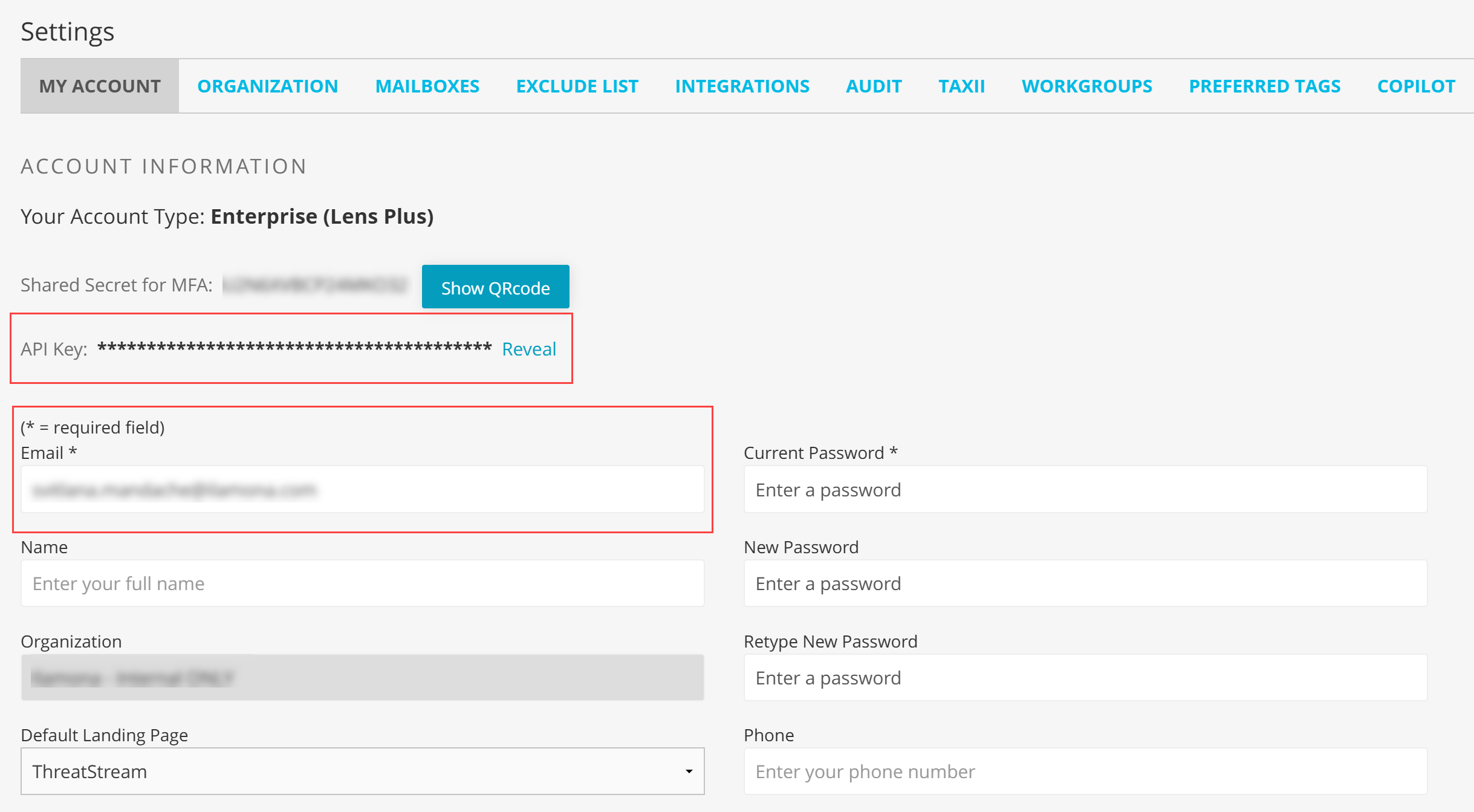
Specifying your username and API Key in the header of the request is the most secure method of authentication. Anomali recommends using this authentication method, as shown in the following example:
curl 'https://api.threatstream.com/api/v2/intelligence/?itype=bot_ip' -H 'Authorization: apikey <username>:<api_key>'
Authenticating to ThreatStream with an OAuth 2.0 Token
For integrating with third-party applications, you can generate an OAuth 2.0 token for accessing ThreatStream API points securely.
Before you begin
Ensure you have the following:
-
Client ID and Secret Key. Client ID and Secret Key are generated in the ThreatStream UI on the Account Settings page.
-
The OAuth token endpoint provided by ThreatStream.
-
curlor any other tool to make HTTP requests (for example, Postman).
To generate an OAuth 2.0 token:
-
Enter the following
curlcommand to request a token:Copycurl -X POST https://api.threatstream.com/oauth/token \-H "Content-Type: application/x-www-form-urlencoded" \
-d "grant_type=client_credentials" \
-d "client_id=<YOUR_CLIENT_ID>" \
-d "client_secret=<YOUR_CLIENT_SECRET>"If the request is successful, you will receive a JSON response similar to this:
Copy{"access_token": "eyJhbGciOiJIUzI1NiIsInR5cCI6IkpXVCJ9...",
"token_type": "Bearer",
"expires_in": 900
} -
Copy the value of the
access_tokenfield. This token is valid for 15 minutes (900 seconds), as specified in theexpires_infield. If it expires, you will have to generate a new token. -
Include the token in the Authorization header when making API requests.
For example,
Copycurl -H "Authorization: Bearer <YOUR_ACCESS_TOKEN>" \
https://api.threatstream.com/api/v2/intelligence/
Using Operators
The first API operator called after the resource must start with a question mark and subsequent operators must begin with an ampersand.
Example:
curl 'https://api.threatstream.com/api/v2/intelligence/?itype=bot_ip&status=active' -H 'Authorization: apikey <username>:<api_key>'API Metadata
The following is an example of typical ThreatStream API metadata:

total_count
The total number of results that can be retrieved by the API call.
approximate_count
When approximate_count=true, the total value returns a partial count for very large result sets for the following endpoints:
-
/api/v2/intelligence/ -
/api/v1/threat_model_search/
This improves response times by avoiding the overhead of computing an exact total for high-volume searches.
If you need an exact total count, set full_count=1 attribute when calling these endpoints, as shown below:
/api/v2/intelligence/?full_count=1/api/v1/threat_model_search/?full_count=1took
Denotes the time in milliseconds ThreatStream took to retrieve the data.
next
Use it to iteratively retrieve the next set of data in the total results. See Using “next” to Iteratively Retrieve Datasets.
limit
Number of results returned when API call is made. See Limiting Results.
offset
The current result row number.
Limiting Results
The limit variable controls the number of results returned every time an API call is made; the total number of results may be much larger than returned in one API call.
If limit is not specified, 20 results are returned with each API call. Specifying limit=0 will return up to a maximum of 1000 results (if available).
Using “next” to Iteratively Retrieve Datasets
In cases where the total number of results is larger than can be retrieved in one API call, use the next field of the returned metadata to make iterative API calls until all results have been returned.
update_id instead of the next field to iteratively retrieve the full dataset. See Using “update_id” to Retrieve Large Intelligence Datasets for more information.Example:
curl 'https://api.threatstream.com/api/v2/intelligence/?limit=5' -H 'Authorization: apikey <username>:<api_key>'
The following is an example of the metadata API call yields :
{
  "meta": {
    "total_count": 6414,
    "took": 7,
    "next": "/api/v2/intelligence/<link_to_next_page>",
    "limit": 5,
    "offset": 0
  }
}
where <link_to_next_page> is the value specified by the metadata in your results.
Therefore, you would use the following API call to retrieve the next five results:
curl 'https://api.threatstream.com/api/v2/intelligence/<link_to_next_page>' -H 'Authorization: apikey <username>:<api_key>'
where <link_to_next_page> is the value to use to retrieve the next set of results
Repeat this process iteratively until next = null. The total number of results you will retrieve by making the intelligence API call iteratively is 6414.
total_count value may not represent the full dataset if approximate_count is set to true in the metadata. Filtering Results
You can filter returned results by specifying attributes and their values in your GET requests.
For basic searches, specify attribute-value pairs as shown in the following example.
Example
curl 'https://api.threatstream.com/api/v2/intelligence/?status=active&tlp=red,amber&type=ip&limit=250/' -H 'Authorization: apikey <username>:<api_key>'
Multiple attribute-value pairs are joined with the AND condition; you cannot use OR condition in basic search. However, an OR is assumed in between values for an attribute that takes multiple values as shown in the above example for attribute tlp.
You can specify more complex conditions using supported operators in advanced search queries. In such cases, the query parameter (q) that includes attributes and their values must be added to the endpoint. Note that the query parameter must be URL-encoded.
Example
curl 'https://api.threatstream.com/api/v2/intelligence/?q=status=active%20AND%20((tlp=red%20AND%20type=ip)%20OR%20(tlp=green%20AND%20type=url)/' -H 'Authorization: apikey <username>:<api_key>'
Refer to each API call attributes to determine the attributes you can filter on and the operators you can use for those attributes.
Running cURL Commands on Linux and Windows Machines
The curl command examples in this document are provided for Linux Shell. If you use Windows Shell to execute API requests, replace single quotation marks (') with double quotation marks (").
Example: